Solo acoustic
A vocal and an acoustic DI feed a single wedge. Confirm the pickup output and who supplies the DI.
Start with a rig close to yours, then make the technical details accurate.
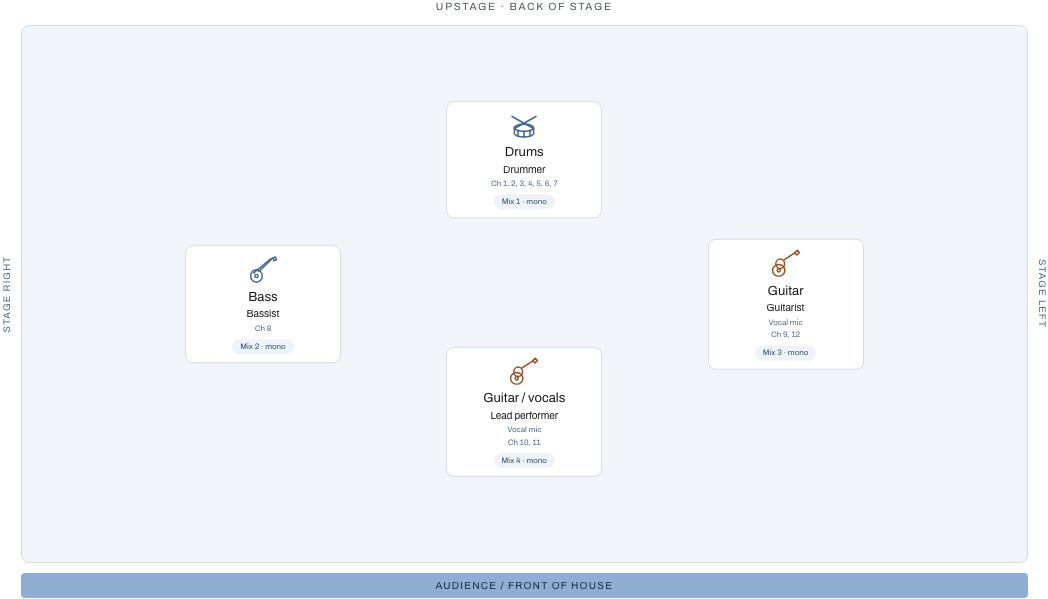
Start with an example, then change the inputs and monitor mixes to match your band. Stage left and stage right are from the performers’ perspective.
A vocal and an acoustic DI feed a single wedge. Confirm the pickup output and who supplies the DI.
Separate vocal channels and wedge mixes let each performer ask for their own balance. This example uses mono keys; check the correct output.
A miked drum kit, bass DI, guitar amps and vocal channels need an agreed microphone and stand inventory. Overheads stay adjacent as a linked stereo pair.
Keep left/right keyboard and playback channels adjacent. This example has a stereo IEM bus and a vocal wedge. Add click separately when required; keep it out of front-of-house.
Multiple stereo IEM buses coexist with shared wedges. Confirm aux-output capacity, ceremony coverage, speeches and playback separately from the band input list.
Replace generic performer names, count every source and verify phantom power against the equipment you bring. State who supplies microphones, DIs and stands. Add your actual production contact only after reviewing what recipients will see.
Positions describe the setup, not a guaranteed stage fit. Ask about usable dimensions, risers, power, changeover time and the available monitor buses. Stereo IEM mixes need separate left/right outputs.
Print clean stage and rehearsal documents without a subscription. Live Show Plus combines saved stage variants, repertoire, setlists, frozen show packs and venue links. The approved target is $29/year or $5/month, included with Unlimited.
Saved-show starter access and paid checkout are awaiting release. The package covers live-show tools; mastering, AI artwork credits and paid release-planner features use their own access.


